Dovetail Calculator
Calculate dovetail bottom width, side length, and cutter limit.
All tools free forever
Tip: Top width + depth + angle define the dovetail section.
Results
Linked Parameter Diagram
dovetailInput / Output Bars
Inputs
Outputs
Geometry View
Mechanical Geometry
Tool role and boundaries
Dovetail Calculator is not a one-shot number widget. It is an engineering baseline tool for real shop-floor decisions. Calculate dovetail bottom width, side length, and cutter limit. This tool supports geometry and fit logic where coordinate definitions and dimensional relationships must stay traceable.
Treat every output as a first-pass candidate, not an immediate production command: run defaults first, tune one variable at a time, and record machine, tooling, fixture, and material-lot context.
Fast baseline workflow
- Run once with defaults to confirm units and expected behavior.
- Lock constraints first (dimensions, machine limits, setup boundaries), then tune controls.
- Change one key variable per iteration and record why it changed.
- Check primary outputs against machine capability before secondary metrics.
- Validate first piece with conservative override before moving to target cycle.
- Store accepted values with revision tags so shift handoff stays reproducible.
Input strategy
Use a three-layer input model:
- Constraint layer: dimensions, tolerances, travels, clamping, controller limits.
- Control layer: speed, feed, engagement, compensation, cycle parameters.
- Target layer: takt time, cost, scrap risk, tool-change frequency.
A common failure mode is pushing control values before constraints are stable. Lock constraints first, then build a stable operating window with small increments.
Output interpretation
Interpret results in order: primary safety checks first, then stability, then economics.
- Safety: no machine, tool, or fixture limit violations.
- Stability: load, thermal, and vibration behavior remains controlled.
- Economics: cycle and cost align with shift target.
Current focus outputs include Bottom width, Side length, Cutter recommendation. If numbers conflict with floor behavior, verify units and inputs before changing strategy.
Geometry reference
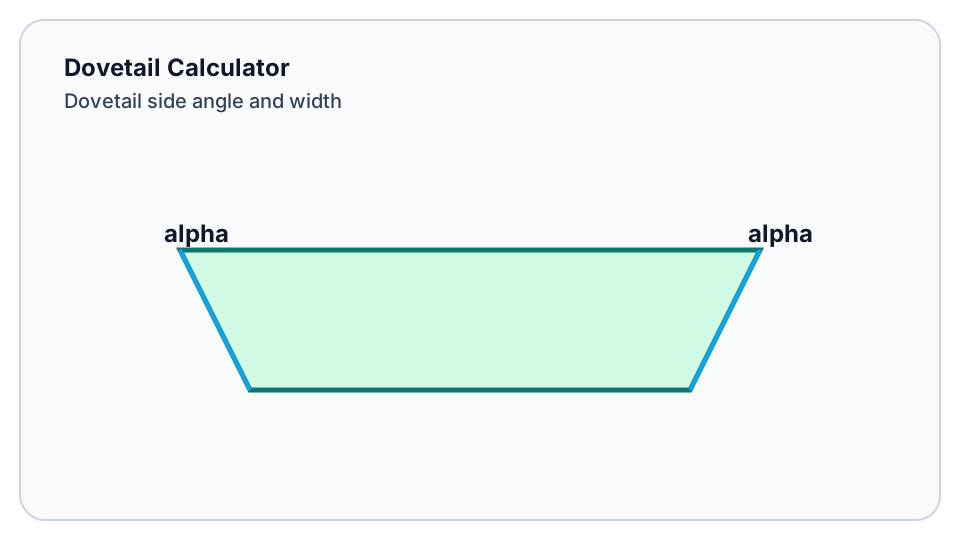
Use this figure to confirm variable naming and sign direction before entering values. This removes a common failure mode where the math is correct but variables are mapped to the wrong feature.
Typical failure modes and fixes
- Sudden output jump: verify units, decimal precision, and input ordering first.
- Unexpected trend: inspect workholding, tool condition, and thermal stability before retuning.
- Big machine-to-machine delta: compare servo behavior, coolant coverage, spindle health, and compensation tables.
- Shift handoff instability: enforce revision logging for program, tool, and parameter timestamp.
Keep rollback points and use single-variable increments to avoid coupled uncertainty.
FAQ
Can outputs be used directly for production?
Not immediately. Validate first piece, then short-run stability, then release to full production.
Why does floor behavior differ from computed values?
This is expected. Material lot, tool wear, thermal state, and machine dynamics all shift outcomes.
When should I recalculate?
Recalculate whenever tooling, fixturing, material lot, controller parameters, or takt target changes.
Related tools
Final recommendation
Use Dovetail Calculator inside a fixed loop: baseline, first-piece validation, single-variable tuning, parameter freeze, and revision tracking. The outcome is not just one result but a repeatable process capability.
Was this helpful?
Thanks for your feedback!
Related Tools
Explore more tools relevant to this workflow.
5-Axis Tilt Calculator
Solve 5-axis tilt and vector transforms with local kinematic formulas and local rules.
Arc Calculator
Get arc length, chord length, and sagitta quickly.
Chamfer Calculator
Calculate depth and end diameter for a turned chamfer.
Coordinate Rotation Calculator
Rotate XY coordinates by angle for programming transforms.
GDT Reference
Check GDT symbols and interpretations from local rules and local examples.
Gear Calculator
Calculate gear dimensions with local formulas and local standards-based rules.